For Type 1 runners

Training that reads your blood sugar.

Glyde learns how your glucose moves on every run and turns it into pacing, training, and fueling that fit your body. Built around your CGM — not a generic plan.

Built for T1D runners · Apple Health, Dexcom, Strava · No insulin dosing, ever

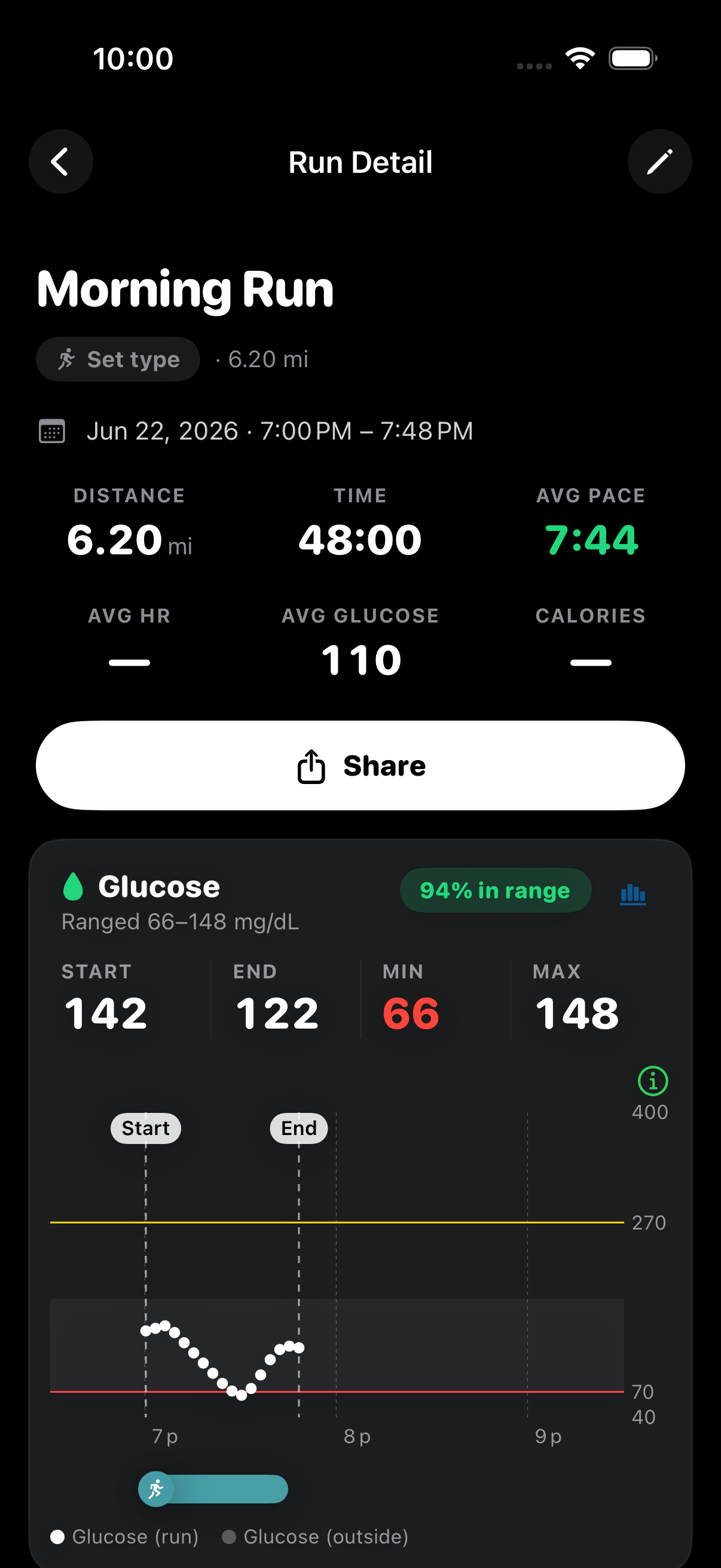
Glyde Run Detail: a 6.2 mile Morning Run with average glucose 110 mg/dL and a glucose card showing 94% time in range, the trace dipping to a low of 66 mg/dL mid-run.

Coach

Next: 20g carbs ~15 min before tomorrow's tempo.

The problem

For a Type 1 runner, every run is a glucose gamble.

Go low and you bonk, cut the session short, or put your safety on the line. Go high and your legs feel like cement. Yet the running apps you already use treat blood sugar like it doesn’t exist — so the one variable that decides the run is the one nobody is watching.

  • Mid-run lows

    A drop you didn’t see coming ends the workout — or worse.

  • Stubborn highs

    Elevated glucose blunts your legs and drags every split.

  • Blind apps

    General running apps track pace and miles, never blood sugar.

What makes Glyde different

Built around your blood sugar, not bolted on after.

Glyde reads the data you already collect and turns your glucose response into pacing, training, and fueling you can actually run on.

Run analysis

Glucose-aware run analysis

Every run overlays your CGM trace on pace and heart rate, with time in range front and center. An AI coach reads the whole picture and gives before, during, and after observations on how your blood sugar shaped the run.
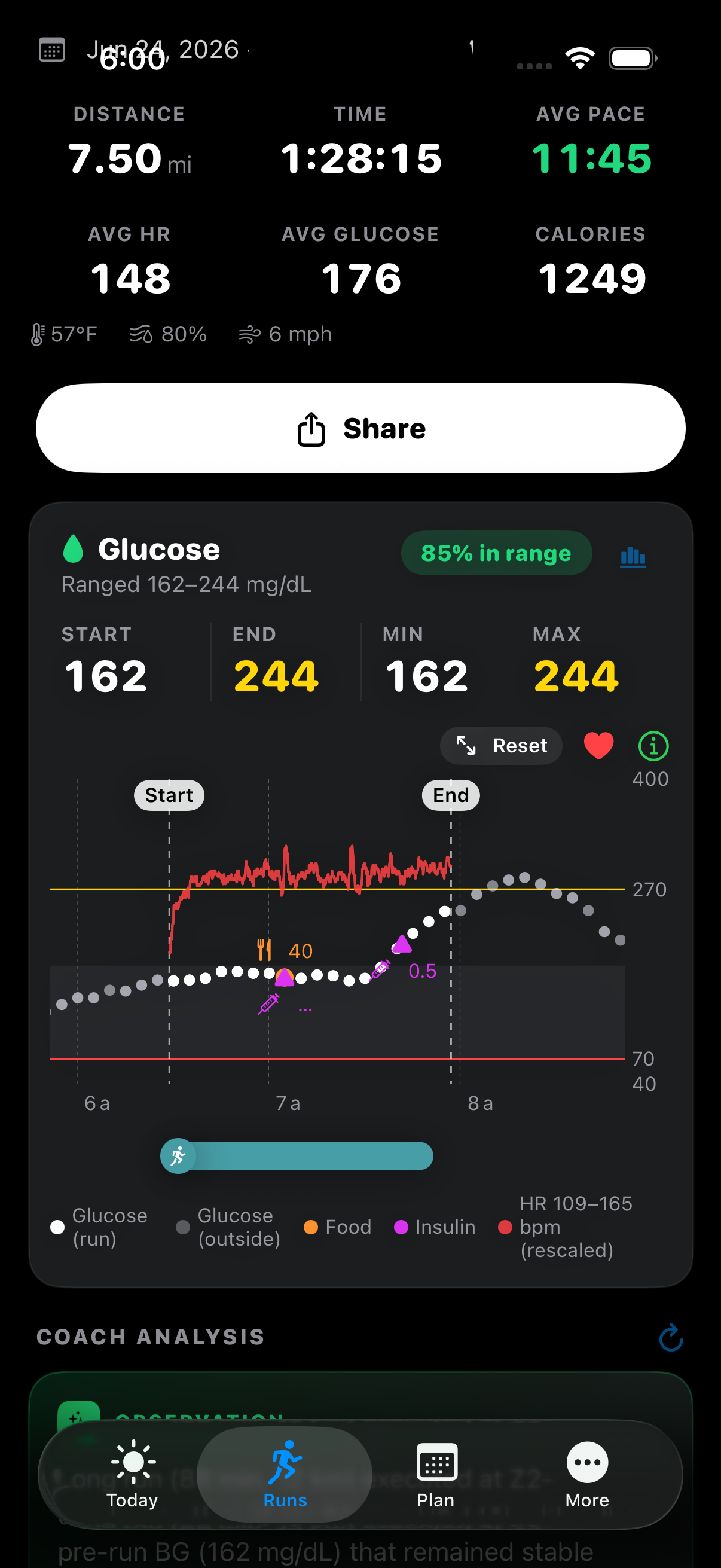
Glyde run detail with the runner's glucose trace overlaid on heart rate, showing 85% time in range across a 7.5 mile run

The engine

An engine that learns your fitness

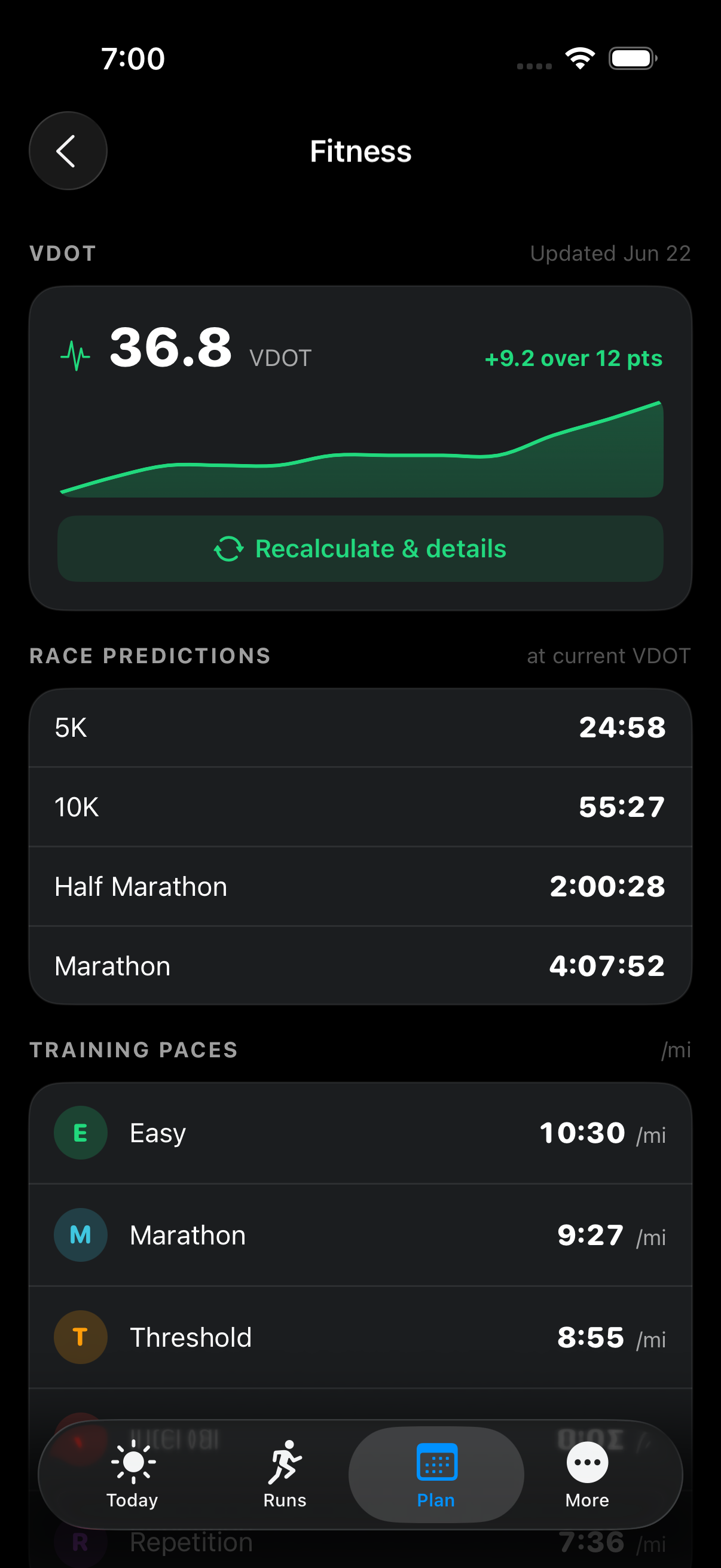
An adaptive Daniels VDOT recalculates from every run — with an HR-anchored aerobic path, so even easy and long runs sharpen the picture. It auto-builds phase-aware plans: base, quality, race, taper.

Glyde fitness page showing the runner’s current VDOT of 36.8 trending up, race predictions, and training paces

On device

Forecasts that run on your phone

On-device Core ML models predict your heart rate and glucose response, personalized to you and computed privately, right on the device.

Connected

Plugs into what you already use

Apple Health, Dexcom, Strava, Tandem, and Google Calendar. Glyde reads the data you already collect instead of asking you to log it by hand.

Other CGMs connect through Apple Health. Tandem insulin history comes in by file import. Calendar sync is one-way out.

  • Strava
  • Dexcom
  • Apple Health
  • Google
  • Tandem

How it works

Three steps. Then Glyde does the work.

Set it up once and keep training the way you already do. Glyde works quietly in the background, turning your runs into insight you can act on.

  1. 1

    Connect your data

    Link Apple Health, Dexcom, Strava, and your pump. Glyde reads what you already track — no new gear, no manual logging.

  2. 2

    Run like normal

    Every run auto-syncs with your glucose trace, heart rate, pace, and splits. Just head out the door.

  3. 3

    Glyde learns you

    It builds your fitness model, adapts your plan, and shows you exactly how blood sugar shaped each run.

Trust & safety

Insight you can trust, on data you control.

  • Never recommends insulin doses

    Glyde gives training and glucose insight only — never dosing advice. Your doses stay between you and your care team.

  • Your data stays yours

    Granular consent over every health source, export anytime, delete your account anytime. Forecasts run on your device.

  • Built with T1D runners in mind

    The whole product is designed around the realities of running with Type 1 diabetes — by people who live them.

Questions

Before you sign up.

The things Type 1 runners ask first. If yours isn’t here, it’ll be answered the moment you’re in.

Does Glyde tell me how much insulin to take?
No. Glyde never recommends insulin doses or any treatment decision — that is a hard rule built into the product, not a setting. It gives training, fueling, and glucose insight only; your doses stay between you and your care team.
Which CGMs and pumps does it work with?
Glyde reads Dexcom directly through Dexcom Share for near-real-time numbers, and reads any CGM that writes to Apple Health. For insulin history, it imports your Tandem pump data by file. The more your gear already shares with Apple Health, the less you do by hand.
Where does my health data go? Is it private?
Your data is stored in a secure, managed cloud database, encrypted in transit and at rest and walled off to your account. We never sell it or use it for advertising. Because Glyde is still in early beta, your data may be reviewed and analyzed — by the team and by automated tools — to improve the app; you agree to this in the terms you accept when you first open it. You give separate consent for health data, and you can export or delete everything anytime.
What does it cost? Is the beta free?
Glyde is in free, invite-only beta through TestFlight today — no charge to join the waitlist or run the beta.
Do I need new hardware or to change my setup?
No. Glyde works with the CGM, watch, and apps you already use. It reads the data you are already collecting, so there is no new gear and no manual logging to keep up.
Is it on Android, or iOS only?
iOS only for now, and it needs iOS 17 or later. There is no Android version yet.
How is this different from Strava or a generic running app?
General running apps track pace and miles and treat blood sugar like it does not exist. Glyde is built around your CGM: every run overlays glucose on pace and heart rate, and an adaptive engine turns how your blood sugar moved into the next plan, paces, and fueling.
How do I get in?
Join the waitlist with your email and we will send a TestFlight invite as spots open. Invites roll out in batches, so earlier sign-ups hear back sooner.

Early access

Be first on the start line.

Glyde is rolling out to Type 1 runners through TestFlight. Join the waitlist and we’ll send your invite.

No spam. One email when your invite is ready.